As customer interest grows, we’re watching the market to support emerging requirements, and are pleased to make PopUp Mainframe X Edition available via AWS, as this blog explains…
Smarter tooling and improved processes can make all the difference in software. Our recent move towards Git, as Bronwyn Davies writes, has helped accelerate efforts to improve how PopUp Mainframe builds software.
Platform engineering continues to gather pace in the software engineering world. At PopUp Mainframe, we have embraced the concept to improve how we build products. Here’s a recap of our recent GSUK conference presentation on the topic.
At the recent GSUK conference, PopUp Mainframe presented a session on some of the most useful open-source tools we are using in our lab. Here’s a recap of the information we shared.
Our Journey With Open-Source Technology
Aiming to improve productivity, over the past year the team at PopUp Mainframe has embraced open-source tooling. Open source has been harnessed within the PopUp development team, helping us implement faster approaches, streamline our build process, and automate countless tasks. We have seen wide-ranging and sometimes surprising benefits of using open source with z/OS and now rely on open-source tools to develop, build, and test PopUp Mainframe product features. And, with customers requesting open-source options for their PopUps, we also share best practice to help them get the most from these resources.
In short, open source is important to us. Here, we outline the open-source tools we are leveraging, and the benefits.
ZTI (Z Terminal Interface)
ZTI is a Python application which gives you a full 3270 interface in your command prompt. It removes the need for a separate (commercial) TSO terminal emulator product, while giving you nearly the same green screen experience. ZTI is great for anyone without a TSO emulator, but it has a whole host of other capabilities too.
ZTI enables you to interact with z/OS through command line – running commands, connecting to the master console, and more. This is powerful because you can script these interactions and include them in applications or automation. We are using ZTI in our team to run z/OS commands and utilising it for master console management too.
CBT Tape
CBT Tape is a library of free software for the IBM mainframe MVS, OS/390, and z/OS environments. It has evolved over decades and continues to expand. Useful CBT Tape facilities we have recently leveraged include –
SHOWZOS – makes MVS control information displayable, such as OS info, software and storage config. This can be web-enabled too.
WHOSON – shows you who else is logged on to TSO at any time.
Xmit Manager – enables you to view the contents of xmit files on a laptop, without having to copy it onto a z/OS system first.
ZOPEN Community
The Zopen community offers a range of tools which have been ported onto Z to help make Unix System Services (USS) easier to use. The more like Linux USS becomes, the better, as it makes USS easier to use for mainframers, as well as making the mainframe world more familiar and “standardised” and therefore easier to develop and maintain by anyone. There are around 300 tools in the zopen community.
Ten of the zopen tools are officially supported by IBM and distributed free-of-charge with the IBM Open Enterprise Foundation kit. These are all available pre-installed on our product. A couple of examples –
Vim: While the Vi editor is available on USS, it’s not very user friendly, and now zopen gives us vim instead. The vim text editor reduces the learning curve for a non-mainframer to be able to make changes very simply.
Bash: The popular Bash shell gives much more functionality than the Bourne shell (the default on USS), such as auto-completion, which saves a lot of time and makes for a more rewarding coding experience.
While these may seem like small benefits, they do add up and can be the difference between a useable, productive interface, and a frustrating interface which continually slows you down.
Zowe
There are two main components of Zowe which we are actively using in our team: Zowe CLI and Zowe Explorer (a VSCode extension).
Zowe Command Line Interface (CLI)
Zowe CLI enables you to interact with the mainframe remotely and use common tools such as shell commands, bash scripts and build tools for mainframe development. It provides a core set of commands for working with datasets, USS, JES, as well as issuing TSO and console commands. It has a very small learning curve since it provides user-friendly help, giving you all options so you can get started without being an expert. By contrast, TSO commands are very brittle and not user friendly, particularly for someone who doesn’t have a mainframe background.
The Zowe CLI is very extensible too, and there are many plugins available which can be used easily by a non-mainframer, and new features are being released all the time.
Zowe Explorer
Zowe Explorer is an extension for VSCode which allows you to interact with your mainframe LPARs through VSCode. Once you are connected, you can view and interact with datasets, USS and jobs through your IDE. Zowe Explorer in VSCode allows you to ‘find’ objects simply, something which is not simple in ISPF. It also enables viewing of multiple z/OS environments at once, and the compare feature is very useful.
CI/CD Pipelines
We have built CI/CD pipelines to deliver mainframe changes, and we have seen the benefits of robust, reliable, and accelerated build, test, and deployment of code changes. One of our CI/CD pipelines looks like this –
The pipeline is orchestrated by GitHub Actions, and is triggered when code is checked in to GitHub
Build is performed using IBM DBB (which is not open source)
IBM Wazi Deploy (not open source) deploys the code to the target environment
For integration testing, we are using Galasa again, this time with Selenium, for end-to-end testing of the mainframe application.
Observability
We have built a mainframe observability solution using Prometheus and Grafana. This has saved us countless hours finding info and troubleshooting and is now a one-stop shop for the team to self-service information. Some dashboards we have built:
A near real-time list of which z/OS environments we have. With PopUps being so quick and easy to stand up, we create new environments and tear them down often. We now have ready access to the full list of PopUps and other VMs, and their status, including which version of z/OS is running, the status of z/OS, a view of some subsystems on each environment, backup details, and more.
License information is now available in one place with expiry dates and number of available licenses clearly visible and trustworthy.
A report to show the usage of DASD volumes, highlighting which ones have usage over a threshold. This helps us manage our lab more proactively instead of waiting for a problem to occur.
We continue to expand our portfolio of dashboards and it is paying dividends for us. The dashboards are also available for PopUp customers and gives them observability out-of-the-box.
Ansible
We also make extensive use of Ansible in our lab – and within our core product. We have built numerous playbooks to manage z/OS environments, including config, software installation, maintenance, and user management. For more details see here.
Where next?
Mainframe innovation is driven by growing demand and fresh ideas from both end-user organisations, vendors, and the wider community. The Open Mainframe Project and other open-source efforts are delivering valuable technologies, and we’re excited about making the most of these advancements and bringing them to our customers through the PopUp Mainframe product.
In today’s enterprise IT landscape, automation and operational efficiency have become a fundamental strategic imperative. At the GSUK conference, the PopUp Mainframe session entitled “Automate the Heck Out of Every LPAR” showcased how automation, particularly using Ansible, is transforming mainframe operations.
Here’s a summary of our discussion.
Why Automation Matters
At the heart of the story, the strategic value of automation sits across three pillars: operational efficiency, customer value, and innovation. For PopUp Mainframe, automation aims to enable scalable, repeatable processes that improve both our internal lab management and customer-facing features and services.
Ansible as the Automation Engine
We presented Ansible as the cornerstone of our automation strategy. It is quickly emerging as a de-facto industry standard to support automating mundane tasks. Its simplicity, powerful z/OS modules, and alignment with industry standards make it an ideal choice for a variety of use-cases. Additionally, Ansible’s marketplace and ease of learning have helped the PopUp Mainframe team quickly understand, devise, build, and deploy our own automation solutions.
Overcoming Technical Challenges
Of course, implementing new technology is never a totally flawless exercise, and adopting Ansible in the PopUp lab wasn’t without its own hurdles. The team encountered issues with VM inconsistencies, z/OS versioning, and password management. These challenges were met with a robust architecture that included GitHub integration, secrets management via IBM Cloud Secrets Manager, and a centralized Ansible control node. Establishing a more robust approach to Ansible implementation needed some thought, but in the end gave us the solid foundation we needed.
Architecture in Action: PopUp Playbooks
The architecture spans both virtual and physical mainframes. Ansible Playbook source code is stored in GitHub, provides playbooks which can be executed remotely against any z/OS environment, and secured with secrets management. This setup ensures flexibility and security while maintaining control over deployments.
The PopUp Mainframe product includes a broad range of Ansible playbooks to help users and product administrators simply and accelerate routine tasks. Our playbook library covers the following areas, all intended to streamline and simplify the administration of the PopUp virtualized z/OS environment –
z/OS health checks
Configuration and user management
Maintenance routines
Software installation
These examples illustrate how automation can handle routine tasks reliably and consistently, and are just the start of our journey. We are constantly adding new playbooks to the product, which we will continue to share with our customers.
Automation Outcomes
The team’s reflections on their journey underscored significant improvements: increased standardisation, documentation of expert knowledge in code, and notable gains in operational speed. These outcomes not only streamlined routine procedures but also laid the groundwork for ongoing innovation and efficiency across the mainframe environment.
Improved standardization, codified knowledge, and speed improvements were all tangible outcomes of our automation journey and, with the resulting Playbooks now provided with the product, we’re delighted to provide the same benefits to our customers.
Tips for Implementation
Reflecting on our own journey towards automation using Ansible, for teams looking to adopt the technology, we would offer the following practical advice:
Leverage the Ansible community. There is a wide variety of support out there if you know where to look, including monthly Ansible community guild calls, an active Discord channel, blogs, LinkedIn groups, forums, and more.
Get team buy-in early. We ran hands-on playbook sessions where all team members were invited to login and run some playbooks. They quickly realised how easy it was!
Define standards (for example using Ansible lint) and write clear README files – this is critical to ensure the playbooks can be run without specific technical knowledge which is key to democratising access to z/OS.
Additionally, determining the right way to measure that progress helps build a tangible aspect to the journey that you can record, report and use to justify further steps.
Looking Ahead
Strategically, the path of continuous operational improvements is never complete. So, for our Ansible implementation, our future plans include:
Better tracking of playbook validation
Building additional custom playbooks for specific use cases
Making playbooks available to customers via AAP (Ansible Automation Platform)
Exploring event-driven automation
Here’s a previous article about the earlier steps in our Ansible journey. For more information on the PopUp Mainframe product, go here.
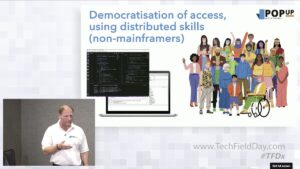
Gary Thornhill, PopUp founder and CEO, had the privilege of presenting a fully featured PopUp demo to a group of mainframe and tech enthusiasts at Tech Field Day at SHARE Kansas City, 2024.
The delegates came from a wide range of backgrounds including appdev, mainframe education, security, DevOps, mainframe services, and Open Mainframe Project.
“What is PopUp? Well, we can popup a full mainframe platform in under 10 minutes, in the cloud or on prem.
We are proud that PopUp runs on IBM zD&T under the covers – tried and true industry-leading z/OS virtualisation software.”
Welcome to the Wonderful World of PopUp Mainframe!
PopUp was born out of a direct need to provide customers with mainframe environments so they can action the mainframe transformations they desire.
PopUp is pipeline-ready, and can be fully administered in a distributed way, using APIs to spawn, clone, and tear down a PopUp just like other virtual machines.
Using PopUp to deploy and test code quickly, test the latest security features, meet regulatory requirements, and test upgrades of Z can liberate your teams to achieve their goals more quickly than before.
Modern mainframes are incredibly efficient, cost effective, and provide better per-core performance than the alternatives.* Migrating workloads away from the mainframe requires careful consideration.
Using PopUp to augment your physical mainframe by enabling faster, cheaper testing on ephemeral environments is a fast track to modernising your mainframe processes and continuing to reap the benefits of the physical mainframe.
Gary discussed the key features of PopUp. Some of the call out points are:
PopUp provides system and helper utilities. For example, to help automate archiving, and CPU utilisation monitoring to assist in capacity management.
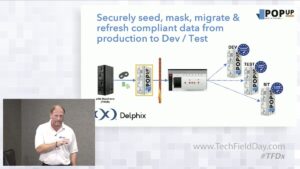
We have extended the Delphix Continuous Compliance engine to enable masking of ANY mainframe data sourcein a consistent, robust fashion across the entire organisational data estate, maintaining referential integrity across all systems, whether they be mainframe or distributed.
Using PopUp & Delphix for Data masking
PopUp Integrates fully with Delphix to utilise the industry-leading data masking capabilities against mainframe data.
Data can be masked on the physical mainframe, or on the PopUp, depending on your needs. Then we use Delphix Continuous Data self-service portal to provision compliant copies.
“Being able to rewind a full production-like mainframe environment at the touch of a button is absolutely massive for productivity and cutting time-to-market.
Marty McFly would be right at home with the 4D mainframe. Think of it as the ‘undo’ button for a mainframe.”
PopUp is a great way to train people new to the mainframe, as PopUp is a disposable, completely isolated environment with zero risk to the physical mainframe – perfect for training.
“With PopUp everyone is welcome and able to be productive with tools of their choice.”
Use cases on the PopUp are only limited to your imagination
Just some use cases for a dedicated mainframe environment:
Development
Use with a desktop IDE
All aspects of Testing including Regression testing against mainframe
Software evaluation
R&D
Proof of concept development
Offshore or 3rd party environment
Training environment
Use of a mainframe data “gold copy” on demand across the enterprise
Checkpoint, forward and rewind data
What we’ve all been waiting for… the demo!
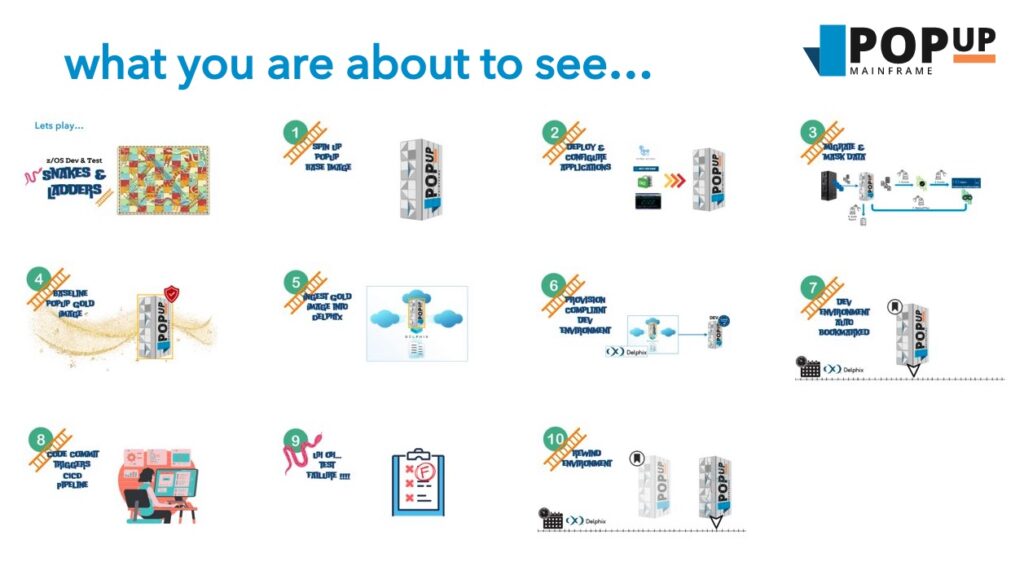
Gary’s demo covered:
Spinning up a PopUp Mainframe in the cloud through the Azure MarketPlace. The PopUp can be ready to go in 6-8 minutes
Deploying and configuring an application using a GitHub Actions pipeline (covering tasks which would usually be done by a sysprog, automated testing of the UI through Selenium)
Masking the sensitive data through Delphix Continuous Compliance
Creating the baseline ‘Gold copy’ PopUp containing the masked data and full application
Enabling easy creation of on-demand virtualized PopUp instances with fast, efficient checkpointing
Provisioning compliant dev environment through the Delphix self-service portal
Developer commits code change into Git, pipeline is kicked off to generate, test and deploy the change onto a PopUp, then do UI testing
Failure of automated UI testing
Rewinding the entire PopUp environment back to the previous version (not just the data, the entire app) through the self-service Delphix portal
How a developer can understand what went wrong and fix it without any environment overheads
Some great questions from the audience…
Cameron asked if we need to install DB2. Answer: No, DB2, CICS, MQ, IMS and other apps come out of the box with PopUp and are available in 10 minutes.
Mark asked if there is an option for customers who can’t move unmasked data off the mainframe. Answer: Yes, masking can be done on the physical mainframe, and only the masked data ported onto the PopUp.
“Using PopUp allows organisations to easily start doing DevOps and automation on the mainframe in exactly the same way they do for their distributed applications today.”
Thanks to all the fabulous delegates who attended and joined in the conversation with energy and insight.
What a great experience! Thanks to the Tech Field Day team, in particular Stephen Foskett, for running such a great session.
“Platform engineering emerged in response to the increasing complexity of modern software architectures. Today, non-expert end users are often asked to operate an assembly of complicated arcane services,” says Paul Delory, VP Analyst at Gartner. “To help end users, and reduce friction for the valuable work they do, forward-thinking companies have begun to build operating platforms that sit between the end user and the backing services on which they rely.”
The ultimate goal of platform engineering is to simplify and accelerate software delivery. By eliminating the burden of various tools, dependencies, and access restrictions, developers can zero in on what they excel at – building systems.
Across the industry, Platform Engineering is becoming as important as DevOps. In this blog, we delve into its transformative application within the mainframe space.
We are thrilled to announce that PopUp Mainframe are partnering with MooodyCow.
MooodyCow are a leading mainframe services provider. Their mainframe specialists cover all areas of mainframe, with a special focus on helping businesses modernise and optimise their mainframe systems.
Our combined vision at PopUp Mainframe and MooodyCow is to deliver cutting edge software and best practice know-how to help organisations achieve their ambitious mainframe optimisation goals.
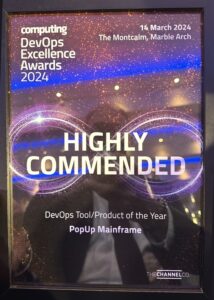
We are very proud to announce that PopUp Mainframe has been awarded Highly Commended in the category ‘DevOps Tool/Product of the Year’ at the DevOps Excellence Awards 2024.
Gary Thornhill, PopUp founder, at the awards ceremony
We are thrilled to be recognised alongside some well-established players in the DevOps space.
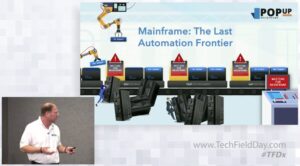
For many organisations, mainframe is often the last piece to achieve automation. Most businesses have established automation and DevOps ways of working for the distributed teams, but haven’t managed to apply these to the mainframe areas yet.
Adopting DevOps for the mainframe poses some unique challenges. These include a lack of dev and test environments in which to trial automation, new ways of working and new tools, as well as lack of innovation opportunity. Compounding this, there is a skills shortage in mainframe and sometimes resistance to change.
At PopUp, mainframe modernisation and mainframe DevOps is at the heart of everything we do.
Our mission is to empower mainframe businesses to deliver changes faster, cheaper and better with on-demand environments for dev and test. We see this as a necessary pre-requisite for organisations to move into this final ‘Automation & DevOps frontier’ (where ALL teams, including mainframe, can embrace automation and DevOps practices), and truly achieve their agility aspirations at all levels.
PopUp enables customers to take mainframe on their DevOps journey by creating fully functioning z/OS instances on-demand, on-prem or in the cloud, and controlling them through pipelines. This overcomes dev and test mainframe unavailability – the number one blocker to mainframe DevOps.
PopUp liberates mainframe teams, enabling automation, DevOps innovation and continuous improvement with no risk to the physical mainframe.
PopUp helps fast track DevOps initiatives in the following ways:
Aiding the implementation of automation and pipelines (e.g. with BMC tooling pre-installed on a PopUp)
Continuously improving ways of working and increasing collaboration
Helping to create real, lasting cultural change
Increasing productivity by reducing wait times
Modern tools boost the productivity of all team members
A catalyst for mainframe innovation and fast feedback
PopUp also provides additional features to boost your DevOps journey which are not available on the physical mainframe. For example, PopUp can be replicated to create multiple z/OS clones including applications and data, and mainframe instances can be deployed and torn down using APIs or pipelines. In conjunction with Delphix, mainframe instances can be bookmarked at any stage, then they can be rewound or fast forwarded to the snapshot using a self-service portal.
Curious to know more about DevOps for the mainframe, how ephemeral mainframe instances can accelerate your projects, or automating your mainframe processes? Contact us.
Breaking news: PopUp Mainframe, the virtual, on-demand mainframe, today announced the general availability of their latest release: ‘Warp Speed PopUp’.
After much innovation, development and rigorous testing, we are proud to unveil the release of our new and improved ‘Warp Speed PopUp’ which has been massively optimised for fast installation and start up.
Our latest version of PopUp (version 2.4Ua) now boasts an installation and start up time of just 10 minutes. This represents an approximate 10-fold improvement on the previous version, which, whist no slouch, took between 45 and 90 minutes for installation and start up. Data compression has also been built-in at the storage level, resulting in a monumentally compact footprint for the Warp Speed PopUp which is now 5x smaller than any previous version of PopUp Mainframe.
The Warp Speed PopUp introduces innovations which enable businesses to further accelerate their mainframe modernisation projects. Lightning fast deployment of PopUp Mainframe instances improves the self-service user experience, greatly shortens the feedback loop and maximises environment availability for dev and test teams.
With BMC AMI DevX tools preinstalled and configured on the PopUp, and in conjunction with Delphix, users can achieve complete mainframe DevOps with the ability to snapshot, rewind and fast forward their mainframe to any point in time.
Get ready to revolutionize your mainframe software development and testing experience with Warp Speed PopUp – the future of on-demand mainframes is here!
“Being able to install and start up a PopUp in less than ten minutes is massive for customers. A team can go from having no extra z/OS capacity to have individual mainframe instances for each team member – in under 10 minutes! This is game-changing for mainframe dev and test teams.”
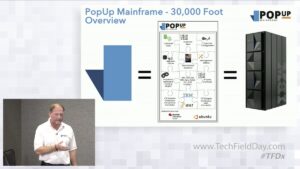
PopUp Mainframe is a cutting-edge mainframe virtualisation product. PopUp provides IBM ZD&T software along with PopUp IP, which has been installed, configured and setup, and is ready to use out of the box. It enables customers to create mainframe environments on-demand and deploy them anywhere, including in the cloud.
Mainframe businesses often cite dev and test environment bottlenecks as the number one blocker to mainframe modernisation. PopUp directly addresses this, providing fully functioning mainframes via self-service, available on-demand. PopUp brings innovation to mainframe teams, providing features not available with a physical mainframe, for example the ability to take a full baseline of a mainframe environment, and replicate that using APIs. PopUp, in combination with Delphix, makes it possible to have a 4D mainframe: users can take a snapshot of a mainframe environment, then rewind or fast forward to a point in time. For an instant DevOps mainframe, BMC AMI DevX tools come shipped with a PopUp – preinstalled and configured, ready to go.
With PopUp, mainframe businesses attract a new generation of mainframe engineers who can use cutting-edge mainframe tooling with PopUp, for example desktop IDEs. PopUp simultaneously appeals to traditional mainframe engineers who prefer green screen and now have the autonomy to spin up their own mainframe environments on-demand. PopUp runs ANY mainframe subsystem or bespoke application.
To provide the best experiences, we use technologies like cookies to store and/or access device information. Consenting to these technologies will allow us to process data such as browsing behaviour or unique IDs on this site. Not consenting or withdrawing consent, may adversely affect certain features and functions.
Functional
Always active
The technical storage or access is strictly necessary for the legitimate purpose of enabling the use of a specific service explicitly requested by the subscriber or user, or for the sole purpose of carrying out the transmission of a communication over an electronic communications network.
Preferences
The technical storage or access is necessary for the legitimate purpose of storing preferences that are not requested by the subscriber or user.
Statistics
The technical storage or access that is used exclusively for statistical purposes.The technical storage or access that is used exclusively for anonymous statistical purposes. Without a subpoena, voluntary compliance on the part of your Internet Service Provider, or additional records from a third party, information stored or retrieved for this purpose alone cannot usually be used to identify you.
Marketing
The technical storage or access is required to create user profiles to send advertising, or to track the user on a website or across several websites for similar marketing purposes.








 At PopUp, mainframe modernisation and mainframe DevOps is at the heart of everything we do.
 Follow us on LinkedIn