
Introducing the New FastTrack User Interface
The PopUp Mainframe FastTrack Option has provided mainframe teams something genuinely new – the freedom to move fast without fear, enabling users to snapshot, roll back, and clone entire z/OS environments in seconds. That kind of capability breeds new confidence, and flexibility, in how teams work.
And it just got better.
Introducing the all-new FastTrack Option 2.0. The same powerful capability is now available to everyone – from within a browser, without ever opening a command line.
From Typing Commands to Click-and-Go
The FastTrack Option originally launched as a command-line interface (CLI) requiring basic Linux skills – powerful, precise, and purpose-built for the technically confident mainframe professional. The CLI remains available to use.
As of now, the new GUI dashboard opens FastTrack to something bigger: the entire team, regardless of whether they live in a terminal window or have Linux skills.
As you open the FastTrack home page, the most striking first impression is how immediately actionable it is. The main controls are right there; no commands to remember, no syntax to look up, no endless tabbing or paging through screens. Starting and stopping the PopUp Mainframe instance, taking a fresh snapshot, or switching to a previous one – is just clicks away.
What You See Is What You Control
The FastTrack dashboard has been designed with clarity in mind. Two pages provide nearly everything you need:
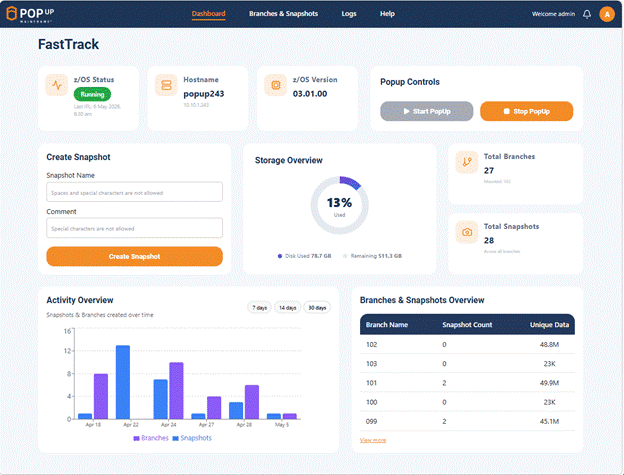
FastTrack Home Page
The Homepage shows users the most important details of their PopUp Mainframe (or just “PopUp”) environment. Is the PopUp running or offline? When was the last IPL? Which FastTrack branch is being used? Which FastTrack snapshot is active? Users can understand immediately, without digging through logs or running status commands. From here, to start or stop the PopUp, trigger a new snapshot, or switch to a saved state – it is a simple point and click exercise.
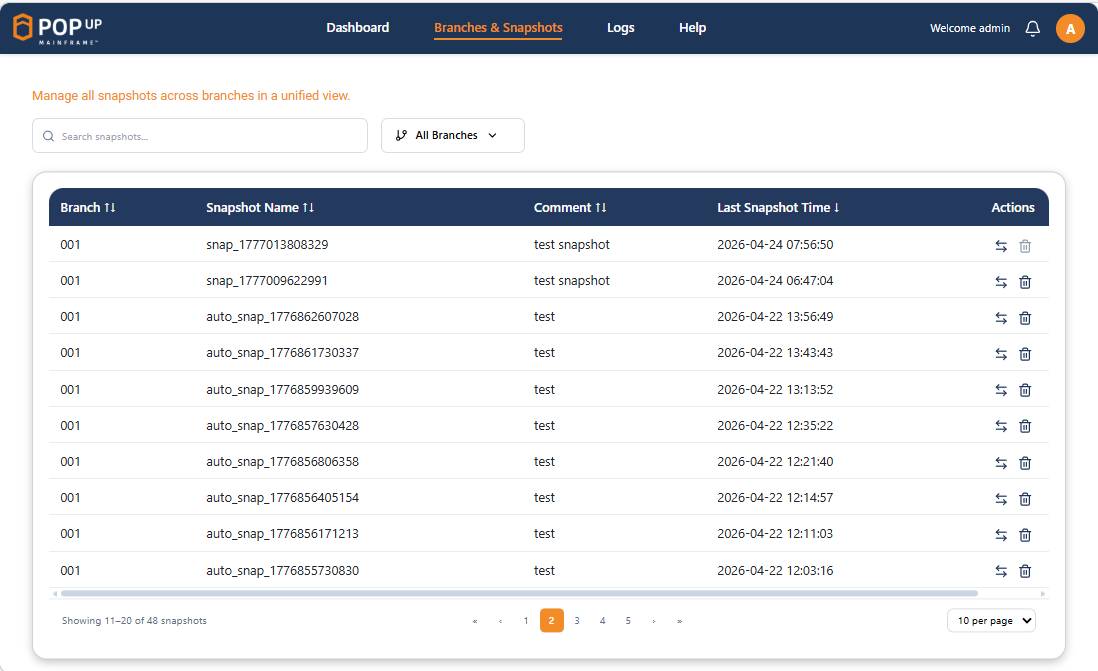
The Branches & Snapshots Page
This page is where the full power of FastTrack becomes visible. Every snapshot ever taken, across every branch, presented in a clean, searchable list. Users can quickly identify what each snapshot represents, when it was taken, and which branch it belongs to. Switching to any snapshot or deleting one that is no longer needed is a simple point-and-click operation. No command flags, no manual lookup, no typos, no expertise required.
For teams managing multiple development streams, multiple environments, multiple software versions, or multiple users sharing the same PopUp infrastructure, this visibility is a meaningful step forward.
Let’s summarise what else FastTrack 2.0 offers.
The Capability Has Not Changed – The Access Has
It’s worth being clear about what has not changed, because FastTrack’s core strengths are unchanged and undiminished: users can still take unlimited snapshots at any point in a development, testing, training, operations, or configuration cycle. They can still roll back to any of them instantly. And you can still send a snapshot to a remote PopUp and have a fully cloned z/OS environment available in seconds, including all of its relevant applications, data, subsystem versions, and configuration. Data compression still keeps the storage footprint lean.
Everything FastTrack Does, Now at your Fingertips
The FastTrack dashboard is one of the most visible expressions of Popup Mainframe’s commitment to making mainframe delivery simpler and faster. A modern, purposeful interface that puts the full power of FastTrack in front of every member of your team – from their browser, with no barriers to entry.
PopUp Mainframe already accelerates mainframe delivery. FastTrack takes it into overdrive. And the new UI means the people who benefit most from FastTrack – developers, QA teams, DBAs, training leads, operations staff – no longer need to be a CLI guru to take full advantage of it.
Not just a usability upgrade, that’s a team-wide productivity hack. Take a look for yourself, here.
Empowering Enterprise Users
The IBM mainframe underpins some of the world’s most critical financial, healthcare, and government systems – and the organizations running them face constant pressure to deliver change faster, at lower cost, with no tolerance for downtime or risk.
The traditional solution has required more resources, more processes, often more cost. PopUp Mainframe’s answer is different- give teams smarter environments, faster.OurFastTrack facility, now with its own dashboard – is yet another example of that approach in action. Through flexible working and better tooling, we aim to revolutionize mainframe delivery.
Next Steps
Explore FastTrack and the full PopUp Mainframe product at Home – Popup Mainframe and FastTrack – PopUp Mainframe. Please also join us for our forthcoming Mainframe Persona Webinar Series, hosted by Planet Mainframe, commencing June 2026. Register here.