From Traditional UI Design to AI-Driven Creation
We recently initiated a project to build a brand-new user interface (UI) for one of our key product features, the PopUp Mainframe FastTrack facility. Traditionally, building a UI means spending hours sketching mock-ups, writing boilerplate code, and manually piecing everything together.
One of the positive impacts of Artificial Intelligence (AI) is the availability of AI tools to rapid streamline that process, using the power of AI prompts — clear, structured requests that guide AI tools to generate exactly what we need.
For example:
“Create a modern dashboard with analytics cards, a search bar, and a sidebar menu.”
Within seconds, tools such as V0.dev and Lovable.dev can transform such a description into a complete, functional website with responsive layouts and production-ready code. You can refine or enhance the output simply by adjusting the prompt — and then choose to use it directly or as an initial foundation for your project.
From Concept to Working UI — Faster Than Ever
Starting from scratch, we needed a complete UI for our React and Node.js application. Using AI design generators and code assistants like V0.dev and Lovable.dev, I simply described our vision — and within moments, they generated a fully functional website complete with layouts, components, and production-ready code.
We chose to use the generated output as mock-up designs, which greatly accelerated the early design phase. Later, I refined the visuals and optimized the structure, resulting in clean, scalable, and customizable code that integrated seamlessly into our stack.
When I shared these AI-generated designs and code with the team, it sparked genuine excitement. It wasn’t just about speed — it marked a shift in mindset, redefining how we build software and inspiring a culture of innovation and curiosity across the team.
Experimenting, Learning, and Adapting
Once the structure was in place, we then set about refining logic and components manually, improving performance, maintaining clean architecture, and tailoring business rules.
Here, ChatGPT, Claude, and GitHub Copilot became indispensable. All three tools are used directly inside VS Code, which makes accessing AI assistance seamless and intuitive during development.
These tools helped me to:
- Simplify complex functions
- Debug efficiently
- Refactor components for maintainability, clarity and speed
- Understand the rationale behind best practices
Each interaction was more than a quick fix—it was a micro learning experience deepening my understanding and guiding better design choices.
Tools That Accelerated Our Workflow
| Tool | Purpose | Key Impact |
| V0.dev & Lovable.dev | AI-powered UI and code generation | Instantly created complete, responsive websites from prompts; refined layouts and produced clean, stack-ready code — cutting design time from days to minutes |
| ChatGPT | AI assistant for coding, debugging, and logic refinement (integrated with VS Code) | Enhanced code quality and readability, simplified complex logic, and improved troubleshooting efficiency through contextual insights |
| Claude | Context-aware code analysis and explanation (integrated with VS Code) | Offered deep reasoning, clear explanations, and logic guidance during development |
| GitHub Copilot | Inline AI code completion within VS Code | Accelerated development with real-time, intelligent code suggestions and auto-completions |
Learning to Reverse Engineer AI-Generated Code
As I worked with AI-generated code, I realized understanding it fully required more than copying and pasting. I developed the skill of reverse engineering—analyzing the structure, logic, and design decisions made by AI. This helped me customize, optimize, and truly own the codebase.
The Human and AI Balance: Why Understanding the Tech Stack Still Matters
AI as an Accelerator, not a Replacement
AI can do amazing things—generate UI layouts, code, and even logic suggestions—but it cannot replace developer insight and experience. A strong understanding of the tech stack, including React, Node.js, MVC architecture, and CSS fundamentals, remained essential throughout this project.
AI helped me move faster, but developers still needed to own the why and how behind every decision.
Where AI Excels
AI was extremely effective in:
- Rapidly scaffolding UI components and APIs
- Generating boilerplate and repetitive code
- Providing alternative approaches and optimizations
- Speeding up experimentation during early development
This significantly reduced development time and allowed me and my colleagues to focus more on refining functionality and user experience rather than starting from scratch.
Warning: AI is not a Silver Bullet
Despite its significant value in improving our innovation, AI is not without its challenges. We will cover lessons learned in another post, but important areas needing special attention included:
- CSS Structure Complexity
- Architectural Misalignment
- Unexpected Changes to Working Code
None of the above challenges were insurmountable, but there was more to learn than we’d first realised.
Key Takeaway: Balance Drives the Best Outcomes
AI accelerates execution, but developers must provide direction, structure, and judgment. Critical thinking remains a very human skill that must be applied at each phase. The most effective approach was a balanced one:
- AI for speed and assistance
- Developers for design, decisions, and long-term quality
A Journey of Continuous Discovery
For myself, and for the team, this project has been as much about learning as building. Every tool, every AI-based action, taught us valuable lessons about prompt precision, UI structure, and coding logic.
- Embrace AI as a partner, not a replacement: AI accelerates tasks but relies on human insight for real value.
- Be intentional with tools: Focus on AI tools that integrate well with your workflow and boost productivity.
- Master reverse engineering: Deep understanding of AI-generated code turns assistance into expertise.
- Commit to continuous learning: AI evolves fast—stay curious and adaptable.
- Balance speed with quality: Fast generation is great, but refinement ensures maintainability.
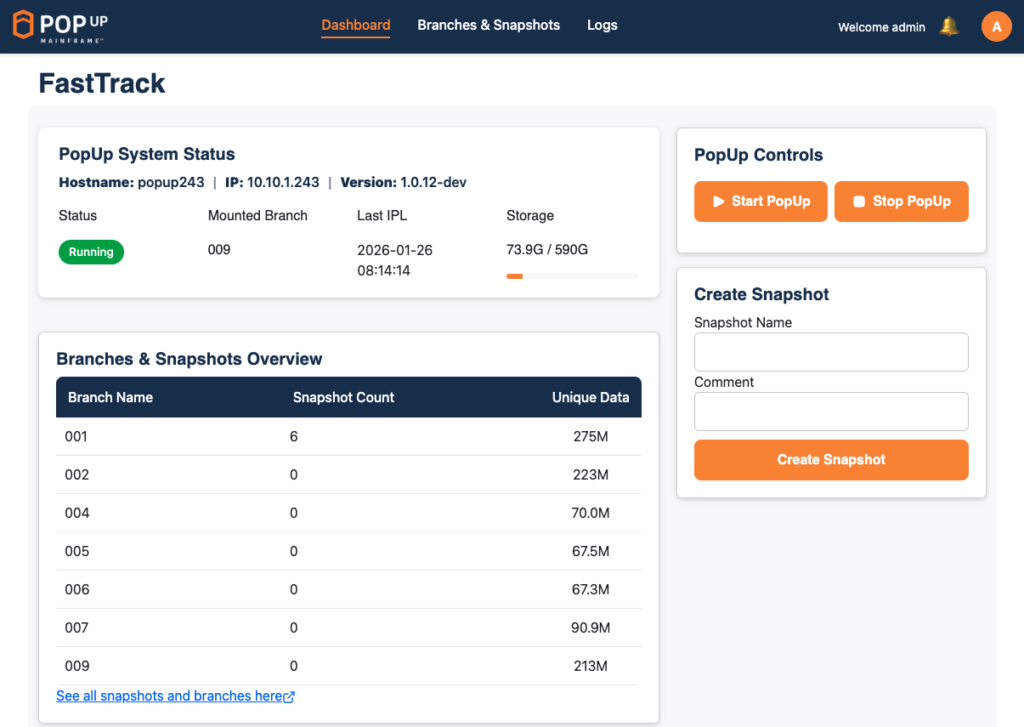
The PopUp Mainframe FastTrack UI homepage enables users, with a few clicks, to start and stop the PopUp Mainframe instance, take a new snapshot or switch to an existing snapshot. It also provides at-a-glance information on status, versions, usage, IPL time, and more.
The Future: A Team Culture Around AI
Our AI journey didn’t stop at individual experimentation. It inspired us to launch an “AI Forum & Showcase” initiative—a space for sharing insights, exploring new tools, and encouraging everyone to leverage AI in their daily work.
When I first showcased the AI-generated mock-ups, the team’s reaction was a mix of surprise, curiosity, and excitement. That moment sparked deeper conversations about how AI isn’t just a support tool—it’s a collaborative partner in development.
Combining AI innovation with human creativity is transforming how the industry approaches software development. I’ve drawn the same conclusion as my development teammates; AI won’t replace developers — but developers who embrace AI will build the future faster.
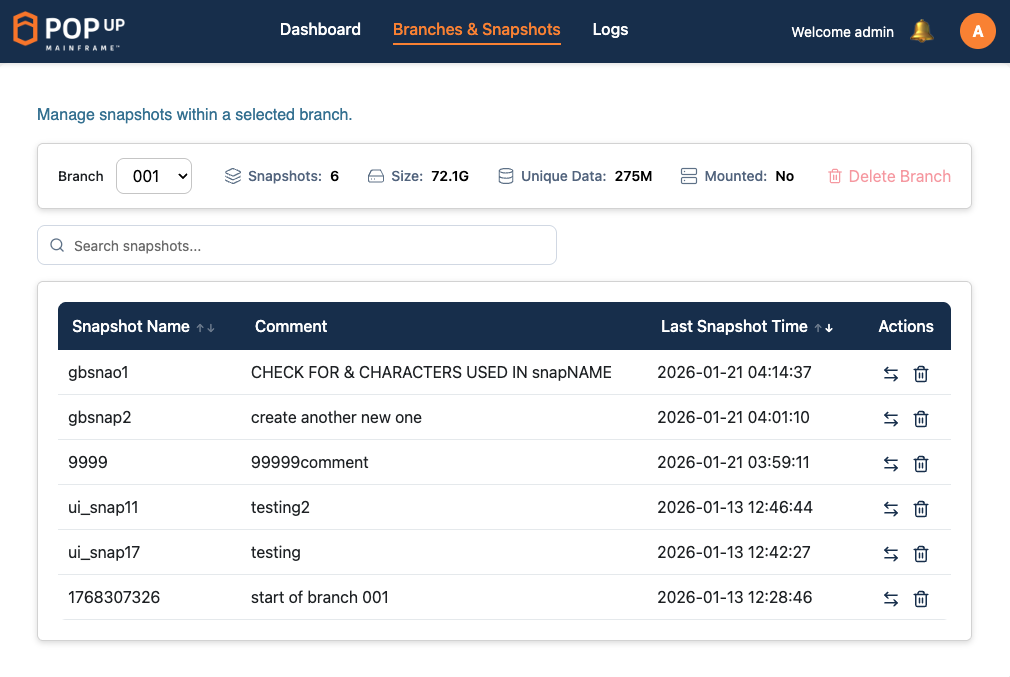
The FastTrack UI Branches and Snapshots page shows a full searchable list of all snapshots and branches, enabling the user to switch to, or delete, any snapshot with just a click.
Learn more about PopUp Mainframe FastTrack here.